Runtime Configuration
Runtime configuration contains settings specific to one scale: network, ingestion URL, scale token, calibration, and measurement interval.
It is done after the firmware has been installed. This keeps secrets out of the firmware and lets the same firmware file be used for several scales.
Enable Configuration Mode
Configuration mode starts automatically when the scale does not have a valid configuration yet, when the saved configuration is invalid, or when the installed firmware is built only to configure the board.
To enable it manually, wake or restart the scale while pressing the configuration button. On current boards, this button is usually BOOT. The LED should show that the scale is waiting for configuration, usually in blue.
Once this mode is active, choose the method that fits your situation.
Configuration Modes
| Mode | When to use it | Access |
|---|---|---|
| Configurator | With a computer and a USB cable, without installing a tool. | /firmware/configurator |
| WiFi portal | Wirelessly, from a computer, phone, or tablet. This is the most convenient option in the field when the scale cannot be plugged into a computer. | http://192.168.4.1/ |
bee-config CLI | Automate configuration or prepare several boards. | Local terminal |
Configurator
The configurator opens in the browser. It configures a scale connected over USB, without installing software on the computer.
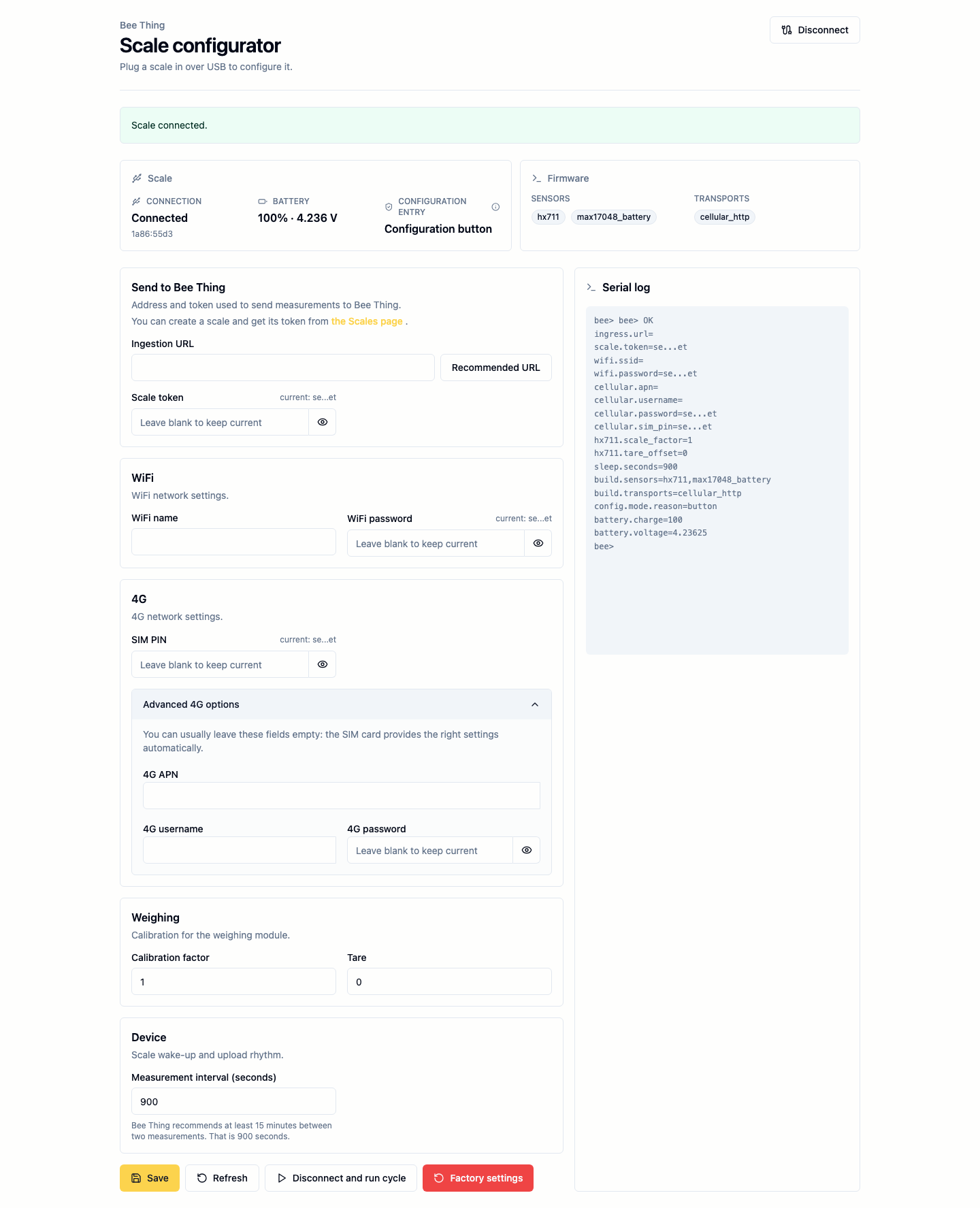
To use it:
- Connect the scale over USB.
- Enter configuration mode with the configuration button. The LED should turn blue.
- Open the configurator.
- Click
Connect, choose the scale port, then fill the fields. - Click
Save. - Click
Disconnect and run cycleto leave configuration mode.
Secret fields are masked. If a secret is already saved, leave the field blank to keep it.
The Recommended URL button fills the ingestion address that matches the connected firmware transport. For a 4G scale, it uses HTTP. For a WiFi scale, it uses HTTPS.
APN, username, and password are in the advanced 4G options: in most cases, you can leave them empty.
The measurement interval is entered in seconds. Bee Thing recommends at least 15 minutes between two measurements, which is 900 seconds.
WiFi Portal
The WiFi portal configures the scale without a USB cable. The scale temporarily creates a local WiFi network named BeeThing-Config.
- Plug in or wake the scale.
- Enter configuration mode with the configuration button.
- Wait until the LED indicates the WiFi portal, usually blue-green / cyan with an animation.
- Connect your phone, tablet, or computer to the
BeeThing-Confignetwork. - Use the password
beething-config. - Open
http://192.168.4.1/in a browser.
Some phones may say that this network has no Internet access. This is expected: the network is only used to configure the scale.
bee-config CLI
The CLI configures the scale over USB from a terminal. It is useful for workshops, tests, and automation.
WiFi example:
bee-config set wifi.ssid "Apiary WiFi"
bee-config set wifi.password "secret"
bee-config set ingress.url "https://example.test/metrics"
bee-config set scale.token "bt_scale_token"
bee-config set hx711.scale_factor "1234.5"
bee-config set hx711.tare_offset "42"
bee-config validate
bee-config save
bee-config run
4G example:
bee-config set cellular.apn ""
bee-config set cellular.username ""
bee-config set cellular.password ""
bee-config set cellular.sim_pin ""
bee-config set ingress.url "http://bee-thing.uiguig.ovh/metrics"
bee-config set scale.token "bt_scale_token"
bee-config validate
bee-config save
bee-config run
In most cases, you can leave the APN empty. If the 4G connection fails, set the APN provided by the operator.
The current cellular transport only supports HTTP. An HTTPS URL will not work with this transport.
Check Scale State
When the scale is in configuration mode:
bee-config showThe response includes why the scale entered configuration mode:
config.mode.reason=config button wakeupIf the command times out, the scale is probably not in configuration mode. It may have completed its normal cycle and gone back to sleep.